
APPLE WATCH TUNER · VERSION 1.1.1
Apple Watch Guitar, Bass and Ukulele Tuner
Tune from your wrist without opening the phone. The Watch tuner listens only after you tap Start Tuning, shows the note and cents offset, and gives a haptic cue when the note is in tune.
Core tools free and offline · no ads · opens the tuner product page
- Guitar, ukulele, bass and chromatic
- Tap to start; stop or leave to end
- Audio stays on the watch
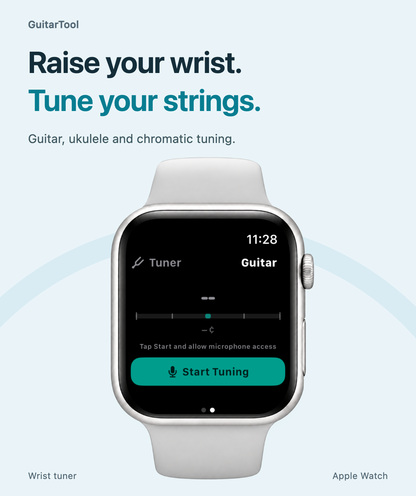
Choose a mode and start listening
Open the GuitarTool Watch app and swipe from the metronome to the tuner. Choose guitar, ukulele, bass or chromatic mode, then tap Start Tuning. Allow the watch microphone when prompted. Pluck one string at a time and read the note and cents offset; a haptic cue confirms an in-tune note.
- Guitar, ukulele, bass and chromatic modes
- Note and cents feedback
- In-tune haptic cue
Keep microphone use under your control
The tuner does not listen just because its page is visible. Tap Stop Tuning to end capture; changing pages or leaving the app also ends it. Pitch is analysed on the watch, and microphone audio is neither recorded to a file nor uploaded.
- Explicit Start and Stop controls
- Capture ends when you change pages or leave
- No recording or audio upload
Get a cleaner reading
Bring the watch close to the instrument, pluck a single string and mute the others. Wait past the initial attack if the reading jumps. The iPhone and iPad tuner in 1.1.1 also improves fundamental-pitch tracking and holds the last reading for about three seconds after a note ends.
- One string at a time
- Reduce room noise and sympathetic vibration
- Check microphone permission if no signal appears
One app for the full practice flow
Tune first. Keep time. Find the next chord.
Download GuitarTool free↗FAQ
Common questions
01Does the Apple Watch tuner record my playing?+
No. Audio is processed locally for live pitch detection and is not saved or uploaded.
02Does opening the tuner start the microphone?+
No. You must tap Start Tuning; Stop Tuning, a page change or leaving the app ends capture.
03Which instruments can I tune?+
The Watch tuner offers guitar, ukulele, bass and chromatic modes.
04Why is there no pitch reading?+
Check that microphone permission is allowed on the watch, move it closer to the instrument and pluck one string at a time.